YOUTH SOCCER · IPHONE & IPAD
Less time sorting lineups.
More time coaching your kids.
Plan your rotations, adjust when someone’s missing, and share the work with your Assistant Coach—so you can keep your attention on the players in front of you. QuarterFlow suggests all four quarters. You review the plan and make the coaching decisions.
In beta · 5v5 through 11v11 · Apple Watch companion
01 / BEFORE KICKOFF
A player’s out.
Keep the plan moving.
An absence shouldn’t mean another page of crossed-out names. Update attendance and ask QuarterFlow for a new rotation.
Let QuarterFlow do the first pass through all four quarters. It suggests field and bench assignments using attendance and the previous saved game’s sit-outs, with goalkeeper turns planned too. You can also set the rotation yourself.
Change the suggestion, mark a missed quarter for a late arrival, or lock a sit-out that needs to stay in place. You’re still making the coaching decisions.
How does QuarterFlow plan a rotation?
QuarterFlow is the rotation feature inside FLiCK ON. Tap QuarterFlow to suggest a rotation for all four quarters. It uses your saved game history to help spread sit-outs and goalkeeper turns across the team.
02 / DURING PLAY
A formation for each quarter.
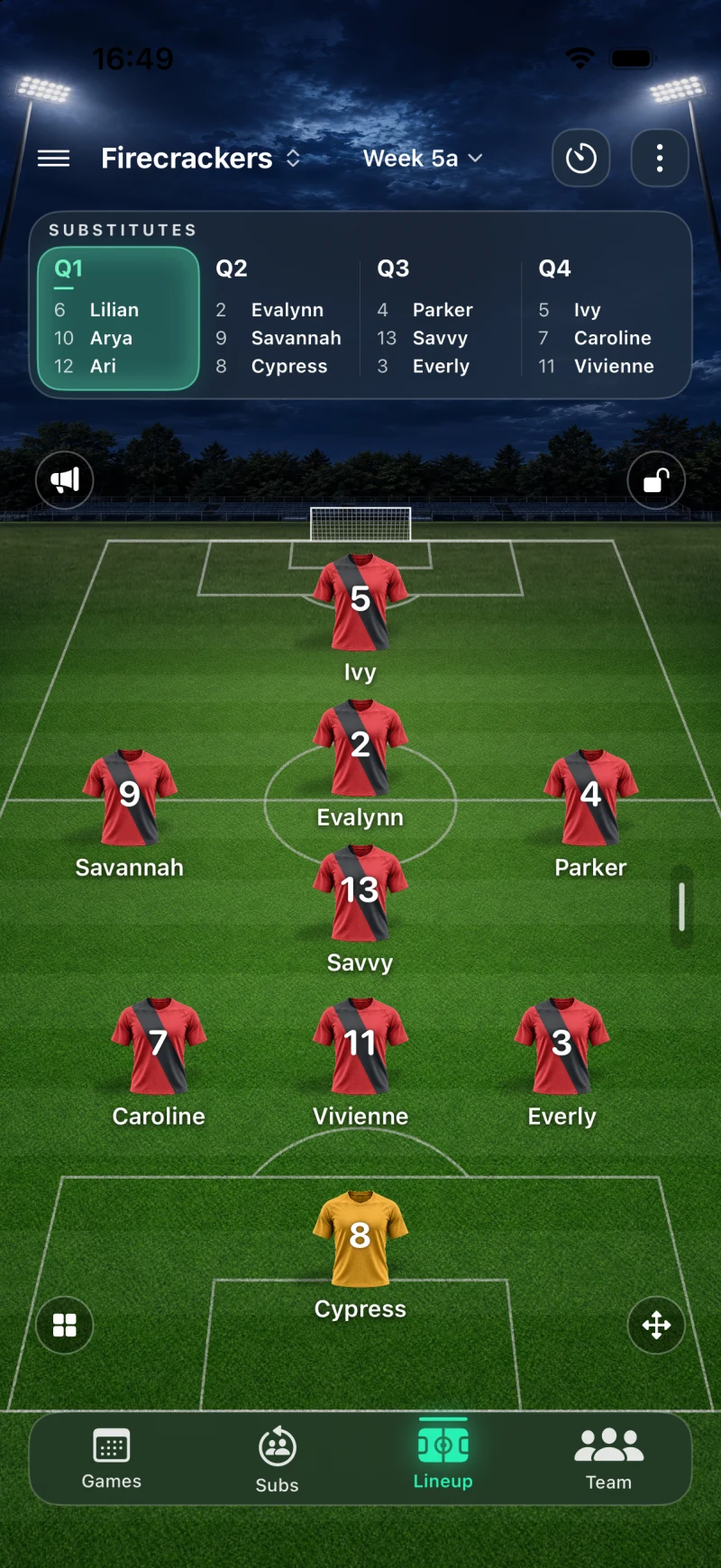
Choose a formation and see where everyone will play. Change the shape for one quarter, carry a plan forward, or move players yourself. Open the bench when it’s time to make a swap.
Five to eleven players on the field, including the goalkeeper. Your team’s usual format, with room to adjust for a particular game.
See the Lineup screen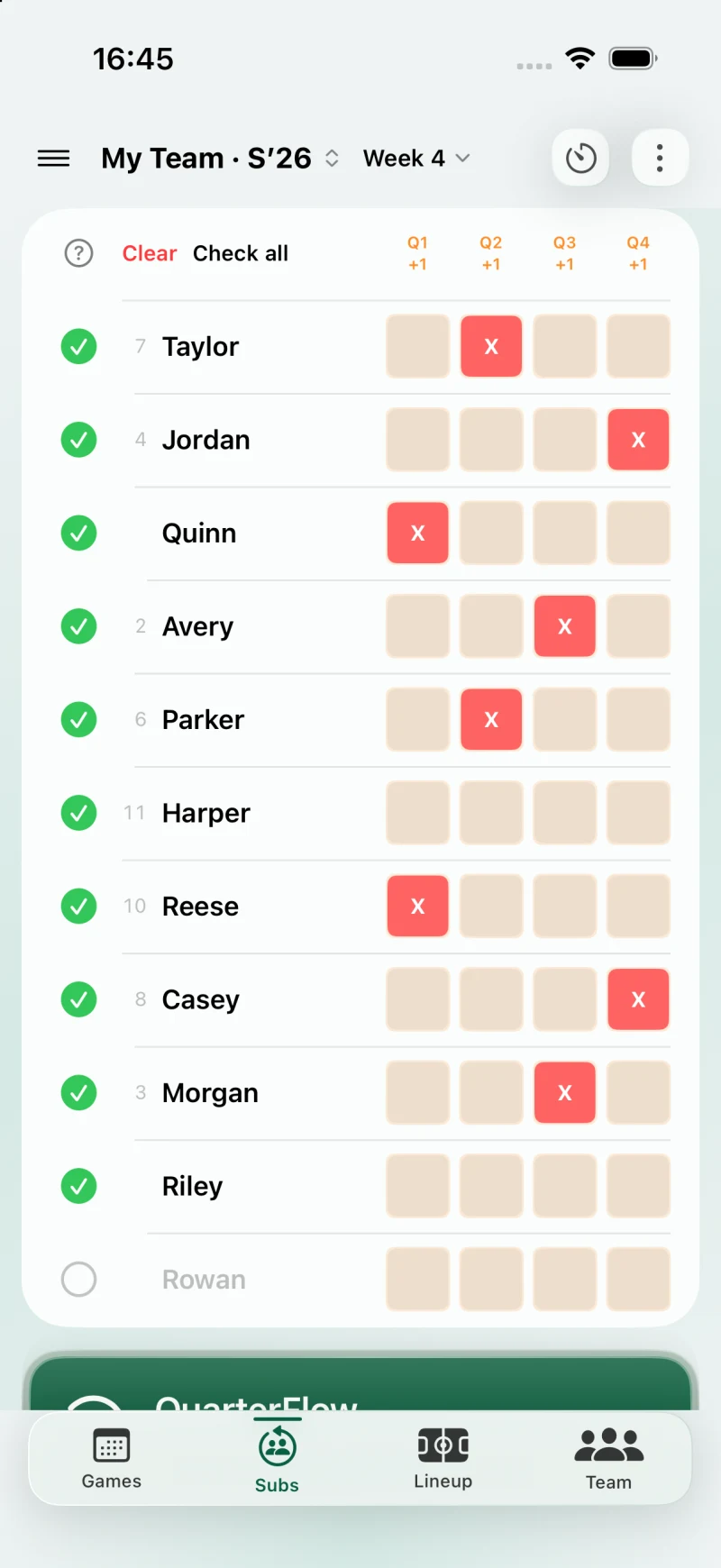
AFTER THE WHISTLE
“Who sat out
last week?”
Next Saturday, you won’t have to start from memory.
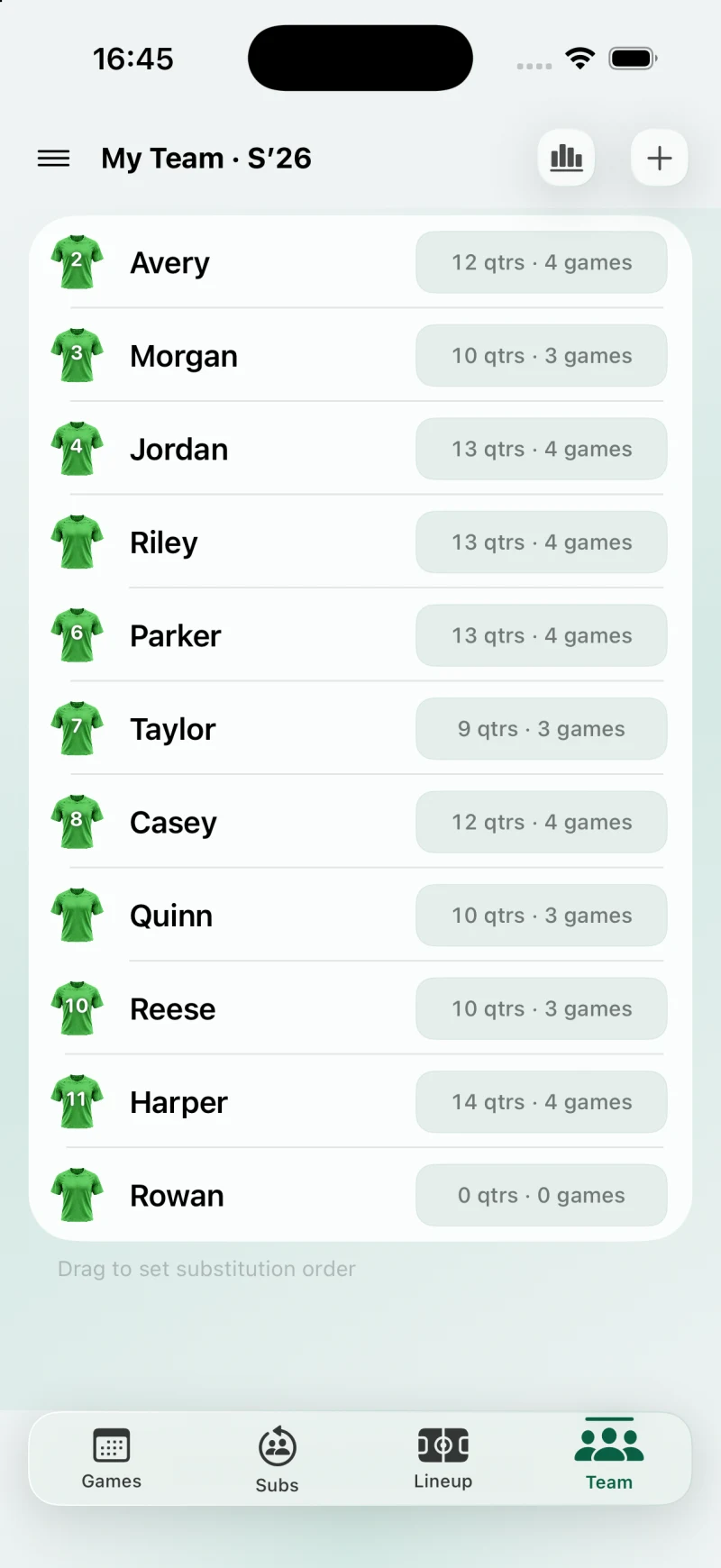
Save the game and keep a record of quarters played, quarters sat out, and turns in goal. Check each player’s season totals on the Team screen and open their history for the details.
Keep the roster you’ve already entered and use the history you’ve already saved. QuarterFlow draws on that history for the next rotation, so next week’s planning starts with what happened last week.
- Phone & Watch timer
- Start, pause, and resume the game timer. The Apple Watch companion adds timer controls and quarter-end alerts.
- Plan without a signal
- Your local roster, lineups, and games work offline without an account. Shared coaching needs an account and internet access.
WHY I BUILT FLiCK ON
It started with
a pen that ran dry.
I’d played soccer for years, so coaching felt like a natural next step. Then I took on a girls’ under-8 team for the spring season. Knowing the game and managing game day turned out to be two different jobs.
I’d planned every lineup and substitution on paper. Then, just before a game, I found out we’d be missing players. The whole plan needed reworking. I’d barely sorted the first quarter when my pen ran out of ink. I had to wing it.
That afternoon, I opened a spreadsheet. At first, I just wanted a plan I could print. But I kept building: rules to balance playing time, spread turns on the field and bench, and rotate goalkeepers. That became QuarterFlow.
A spreadsheet helped me prepare. I needed something I could change on the sideline and use again next week. So I sketched screens on graph paper and built a working app.
I coached with it for a season, adding features and refining the screens as I went. Now I’m sharing FLiCK ON with other coaches.
I built it to spend less time rebuilding lineups and more time coaching. I hope it helps you as much as it’s helped me.
A FEW PRACTICAL QUESTIONS
Before you get started.
For iPhone and iPad, with an Apple Watch companion. The screens here use sample teams in the actual beta app.
How does it track playing time?
FLiCK ON records quarters played and quarters sat out when you save a game. QuarterFlow uses attendance and saved history to suggest the next rotation. It doesn’t measure exact minutes; you review the plan and make the final decisions.
Do I need an account?
You can manage a local team without one. To share with another coach, you’ll need a QuarterFlow account using Sign in with Apple. Shared updates need an internet connection.
Can my Assistant Coach change the lineup?
Yes. Invited Assistant Coaches can help update the team and game on their own device, without buying their own plan. A lineup lock holds editing control for one coach; the other coach can request an unlock. The megaphone sends a separate lineup alert, with delivery depending on internet access and notification settings.
Which features need a paid plan?
For public launch, managing multiple teams, QuarterFlow, and saved playing-time history are planned as Plus features. Inviting Assistant Coaches is planned for Pro; invited Assistant Coaches won’t need their own paid plan. FLiCK ON is still in beta, and plan details will be confirmed before release.
CURRENTLY IN BETA
Want to try it with your team?
Ask us about beta availability for FLiCK ON. Tell us your team’s age group, game format, and whether you coach with an Assistant Coach.
If the button doesn’t open your email app, write to
support@thegroundworkstudios.com